Family Calendar App Comparisons - we found you the best family calendars for 2026!
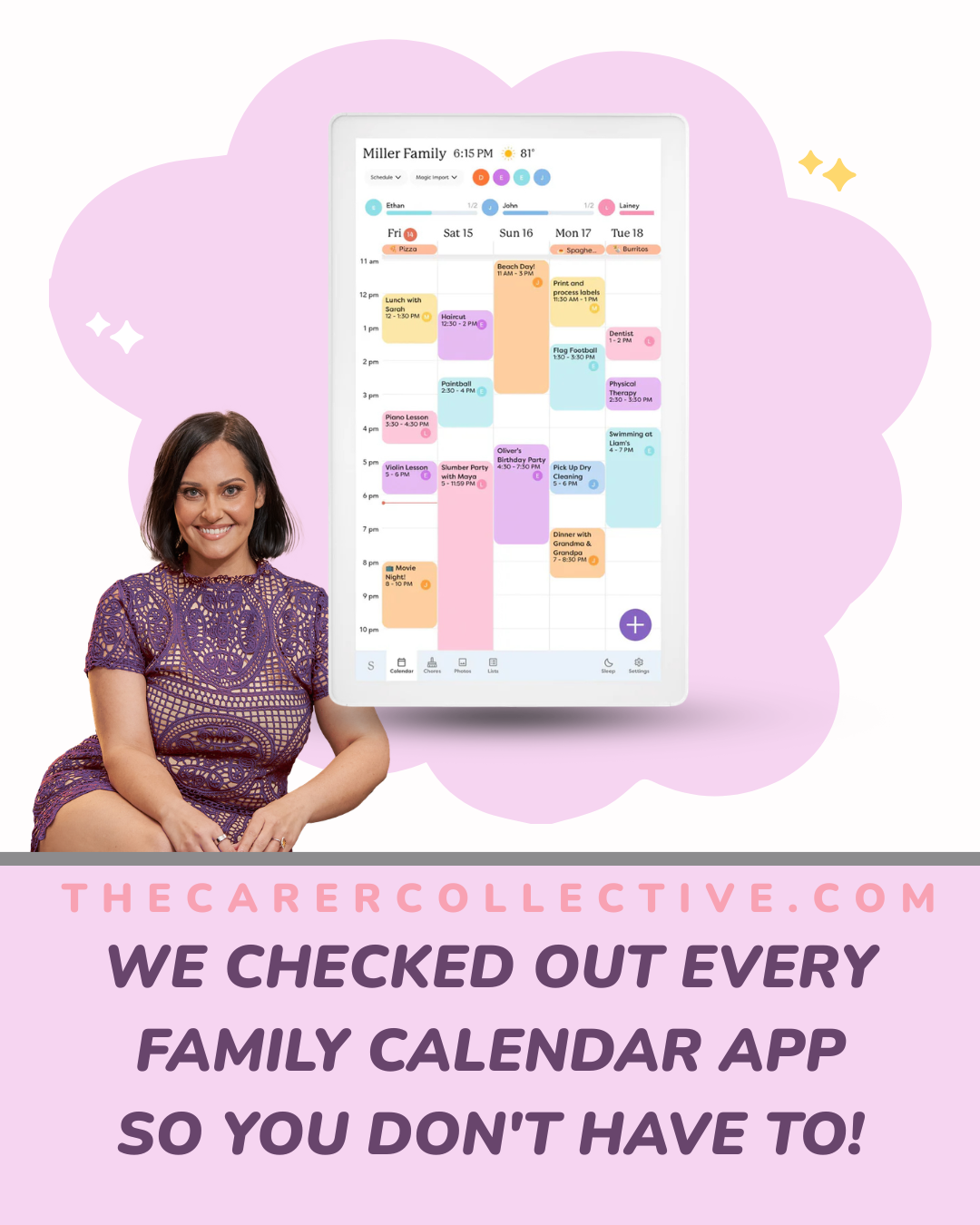
The Best Family Calendar App (and Wall Options!) for Australian Families
If you're managing a busy household with NDIS plans in it as well, staying organised is so close to impossible it just sucks. Life is swings and roundabouts and frankly, a family that's drowning has to float before they can swim. And that includes starting to pull yourself out of the reactive state our households can end up in so often.
How do you do that? By scheduling your life and family! It doesn't have to be perfect, you just choose one - and take your best next step, once at a time.
Good news, there are a ridiculous amount of very good tools that are about to make family life so much easier.
You might want:
a free app on your phone like me (I use Timetree to schedule my workers’ shifts, and the kids’ medical and therapy appointments)
a smart screen on your kitchen wall
or a good old whiteboard or simple printable with a few Command Strips.
This guide covers the best family calendar app options available in Australia right now.
Hot tip: Organised lives exist beyond a Skylight Wall Planner! (not that there’s anything wrong with that. Some of my best friends are Skylight users.)
We've researched the top budget-friendly family planning apps to use on a cheap tablet, as well as all of the premium wall-mounted digital family planners.
Table of Contents - tap to jump
What’s best for YOUR family? | tap to jump
Families with very curious kids → Mount-It! Anti-Theft Locking iPad Wall Mount
Families who rent or want a no-drill setup → Dockem Koala Tablet Wall Mount
Families who also need to manage work → Upbase
Families drowning in school emails → Jam
Families who want no subscription fees → Dragon Touch
Families who want a free all-in-one app → Cozi
Families who want kids involved in chores → OurHome
Families already using Google → Google Calendar
Families who want a lifetime payment option → FamCal
Families who want a premium wall screen → Skylight
Families on a tight budget → Otto Whiteboard
Families who want a huge screen → BIGASUO
Family Calendar Apps for your Phone
These are the best family calendar apps for families who are always on the go. Most of them are free or very cheap, and they work brilliantly as a shared family calendar app across iPhones and Android phones. Everyone gets their own colour so you can see at a glance who is doing what and when!
Cozi Family Organizer | Best FREE Family Calendar App!
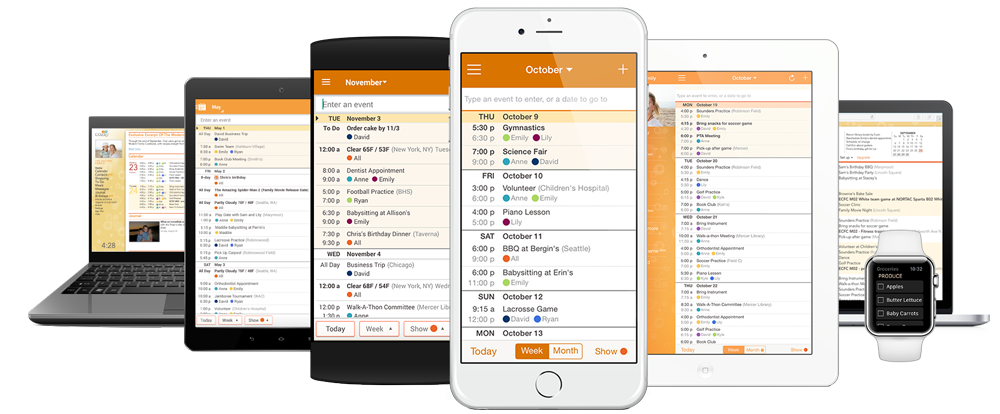
Best for families who want a free all-in-one organiser app
Cozi is one of the most popular family calendar apps in Australia, and it’s easy to see why. Everything your family needs is in one place: a colour-coded shared calendar, shopping lists, to-do lists, meal planning, and a full recipe box with a no-dim cooking mode so your screen stays on while you cook.
Everyone in the family shares one account, which means everyone is always looking at the same information. It doesn’t matter what device they are using. You can add events, see who is going where, and never miss the one thing you need from the shops.
The free version gives you about 90% of the app, which is genuinely impressive for freemium model. Cozi Gold (around $4-5 a month) removes ads and unlocks extra features including events more than 30 days ahead, more reminders, mobile month view, change notifications, and a birthday tracker. It rates about 4.7 stars on the App Store in Australia, and I often refer support coordination families to Cozi.
Download Cozi on the App Store | Download Cozi on Google Play
FamCal – Shared Family Calendar
Best for families who want a beautiful app with a lifetime payment option
FamCal has had over a million downloads and holds a 4.8 star rating from Apple users. It is easy to navigate and looks great. You can assign roles for adults and kids and give each person their own colour-coded events. There is also an agenda view, shared lists, shopping lists, task assignments, memos, and export features.
The free version is limited but the paid subscription is AUD $36.99 for 12 months. Even better, there is a one-off lifetime payment of $91.99 which makes it one of the most cost-effective family organiser apps around if you plan to use it long term.
Download FamCal on the App Store | Download FamCal on Google Play
TimeTree
Best for families who want event planning and multiple group schedules
TimeTree has more than 5 million downloads globally and for good reason. It is especially good at event planning and lets you create separate calendars for different groups, so you can have one for family, one for sport, one for school, and more. It also supports public calendar sharing, which is handy for community groups and school timetables.
Download TimeTree on the App Store | Download TimeTree on Google Play
OurHome
Best for families who want kids involved in chores
OurHome is one of the best family calendar apps for getting kids excited about routines and chores. It turns chores into a game with points and rewards, which makes it brilliant for younger children. It is specifically designed with kids in mind, so even little ones can use it easily.
Download OurHome on the App Store | Download OurHome on Google Play
FamilyWall
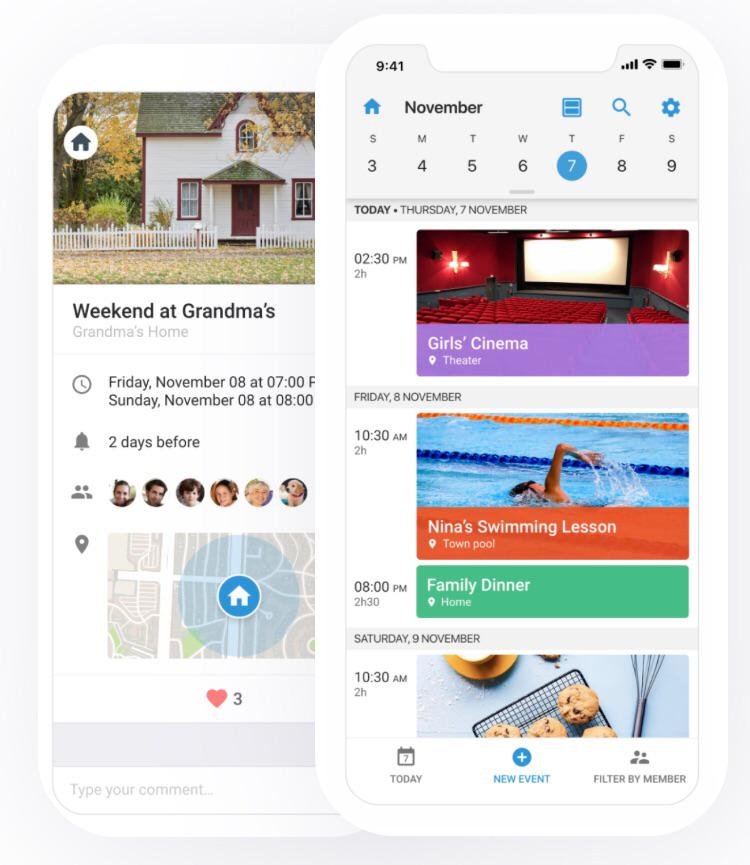
Best for families who want location sharing and secure chat
FamilyWall does everything you would expect from a shared family calendar app but adds location sharing and a secure private family chat. This makes it a great option for families where kids are starting to travel independently and parents want peace of mind. It also includes reminders, lists, and messaging all in one place.
Download FamilyWall on the App Store | Download FamilyWall on Google Play
Jam
Best for families drowning in school emails
Jam is a newer family calendar app that solves one of the most annoying problems for parents: the endless stream of school emails. You can forward a school email straight to Jam and it will automatically pull the events into your calendar. New sport schedule? Let it enter itself. That alone is worth downloading it! It also links shopping lists to due dates and lets you share responsibilities with your partner.
Google Calendar
Best for families already using Google
If your whole household is already using Google, this is a completely free digital family planner that most families overlook. You can create multiple shared calendars, colour-code each family member, and set reminders that sync instantly across every device. It is simple, reliable, and works beautifully across iPhones and Android phones.
Download Google Calendar on the App Store | Download Google Calendar on Google Play
Upbase
Best for families who also need to manage work
Upbase is a powerful digital family planner that works for both family and work schedules at the same time. It combines shared calendars, task lists, a notepad, and messaging all in one place, and it is free for unlimited users. There is a small learning curve and advanced features need a paid plan, but it is a fantastic option for families who need a bit more depth in their family calendar software.
Wall Mounted
If you want one central spot in the home where every single person can see the family schedule — without needing to pick up a phone — a wall-mounted option is the way to go. These are the best family calendar options for visual learners, kids, and anyone who loves the idea of a big clear screen in the kitchen or hallway!
1. Turn Your iPad Into a Wall Calendar
You can mount an iPad you already own, or buy a cheap refurbished or Marketplace iPad. Secure it to the wall and use it as a full family calendar screen.
Pair it with Google Calendar, Cozi, or any family organiser app and you have a free digital wall calendar right now. All you need is a wall mount. Here are three great options available on Amazon Australia:
2. Dockem Koala Tablet Wall Mount (Command Strips)
Best for families who rent or want a no-drill setup
The Dockem Koala is a genius little product. Two small plastic brackets sit on your wall and cradle your iPad — no case or special attachment needed. It works in portrait or landscape mode and has built-in cord clips to keep charging cables tidy.
The adhesive version uses 3M Command Strips so there are no holes in your wall, making it brilliant for renters. A screw-in version is also available if you want something more permanent. It fits most iPads and tablets up to 11mm thick. If you have a thicker case, the Koala Mount 2.0 version accommodates up to 13mm.
Buy the Dockem Koala on Amazon Australia
3. elago Home Hub Mount (wall screws)
Best for families who want a clean, sleek wall setup
The elago Home Hub Mount holds your iPad between two pieces of scratch-free silicone so it is always protected. It is low-profile and comes in white, black, and dark grey to blend in with your wall. All screws and plastic anchors are included, and there is a built-in cable management button to keep cords tidy. It works with iPad mini, iPad Air, and iPad Pro across multiple generations. It is especially great if you use Apple Home, since it positions your iPad as a permanent smart home control hub.
Note: It does not work with adhesive strips — it screws into the wall. Renters may want to use the Dockem option instead.
Buy the elago Home Hub Mount on Amazon Australia
4. Mount-It! Anti-Theft Locking iPad Wall Mount (Wall Screws)
Best for families with very curious kids
If you need something that locks, this is it. The Mount-It! enclosure is built from solid steel and comes with an Allen key lock that keeps your iPad secured against the wall. It covers the power and home buttons to stop little hands from pressing things they should not. It works with iPad 2, 3, 4, Air, Air 2, and iPad Pro 9.7 inch models.
Buy the Mount-It! on Amazon Australia
Digital Wall Calendars
If you want a purpose-built device that does not need a separate tablet, these dedicated digital wall calendars are brilliant. Most of them sync with Google Calendar, Apple Calendar, Outlook, Cozi, and Yahoo.
Here is what most models include:
Big touchscreen displays everyone can see from across the room
Colour-coded family schedules
Chore charts and meal planners
To-do lists and shopping lists
Some can read emails, flyers, and photos and automatically turn them into calendar events
Extra features via a yearly subscription plan
Kmart 15.6-Inch Digital Family Calendar — ~$229 AUD
Best for families who want a budget digital calendar and can find one in stock
Kmart released this digital family calendar at Black Friday 2025 for $199 and it sold out within minutes. It caused an absolute social media frenzy across Australia and honestly, it is easy to see why! It syncs with your phone, displays shared family schedules, and doubles as a digital photo frame. It currently sits at $229 on the Kmart website though stock has been limited. Keep an eye on restocking in 2026.
Big W 15.6-Inch Digital Family Calendar — ~$199 AUD
Best for families who want the most affordable dedicated digital calendar
Big W jumped in with their own version priced at $199. It includes a family schedule, to-do lists, meal planning, chores, and a reward system. A great budget-friendly option if you can get your hands on one while stocks last.
Dragon Touch Digital Calendar
Best for families who want no subscription fees
The Dragon Touch is a subscription-free alternative to the premium brands. It has colour-coded profiles, a chore reward system with stars for kids, and is completely free to use after purchase. No monthly or yearly fees.
Buy the Dragon Touch on Amazon Australia
Denash 15.6-Inch Digital Calendar
Best for families who want a subscription-free screen with a 1080P display
The Denash has a crisp 1080P HD touchscreen that is easy to read from across a kitchen or living room. It syncs via Wi-Fi, connects to your existing calendars, lets you manage chores and meal plans from the screen or the mobile app, and doubles as a digital photo frame. Completely subscription-free with no hidden costs whatsoever.
Buy the Denash on Amazon Australia
BIGASUO Digital Calendar
Best for families who want a huge screen
If you want the biggest screen possible so nothing gets missed, the BIGASUO is your pick. It features a 21.5-inch display with colour-coded tasks, auto-sync, and photo and video sharing from your phone. Like the Denash, it is completely subscription-free.
Buy the BIGASUO on Amazon Australia
Skylight Smart Family Calendar — from ~$529 AUD
Best for families who want a premium wall screen
The Skylight is the most polished dedicated digital family calendar available in Australia. The 15-inch glossy antiglare HD touchscreen is wall-mountable. There is also a 27-inch Skylight Calendar Max for families who want an even bigger screen, and a separate Skylight Frame product in 10-inch and 15-inch sizes designed as a digital photo frame.
It syncs with Google, Apple, Outlook, Cozi, and Yahoo. Features include day, week, month, and schedule views, a weather forecast for your event times and locations, event countdowns for birthdays and holidays, sleep mode, and a parental lock to stop kids editing schedules. You can also link multiple Skylight Calendars across different rooms or households.
The free Skylight app lets you update everything on the go. The Skylight Plus paid plan (currently $124.99 AUD/year) unlocks chore and meal planning, the photo-frame display mode, and the AI Sidekick feature which turns emails, PDFs, and paper schedules into calendar events automatically.
The Skylight Calendar also qualifies as NDIS low cost assistive technology under Core Consumables, support item code 03_222100911_0124_1_1 for cognition and memory support. Australian NDIS AT suppliers describe it as a tool that supports predictable daily routines and reduces reliance on constant verbal prompting from carers — particularly helpful for participants with autism or ADHD.
Get 10% off your Skylight Calendar here
Amazon Echo Show 15
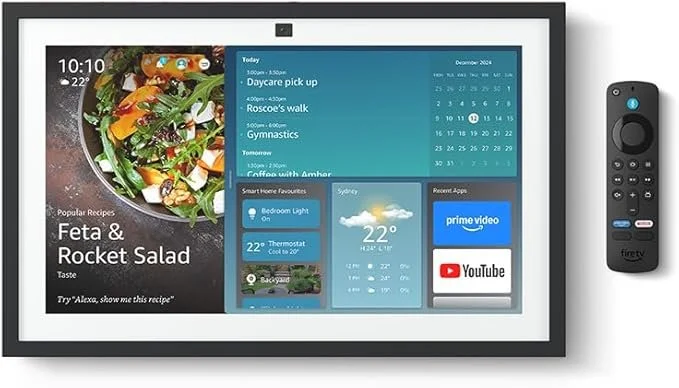
Amazon Echo Show 15 is a good all rounder, and you’ll benefit from Amazon’s excellent customer service and returns policy.
Best for families who want a calendar and smart home hub in one device
The Amazon Echo Show 15 is a 15.6-inch smart display that works as a digital calendar, smart home hub, digital photo frame, news and weather dashboard, and entertainment screen. Built-in Alexa lets you control smart home devices with your voice. It supports Google, Microsoft, and iCloud calendar syncing. If your family is already deep into the Amazon or Alexa ecosystem, this is a brilliant all-in-one option.
Buy the Amazon Echo Show 15 on Amazon Australia
Gmail Google Calendar on a Tablet
Best for families who want a wall calendar without buying anything new
If you do not want to buy a new device, mounting an existing tablet on the wall with Cozi or Google Calendar open is completely free. This is a surprisingly powerful digital family planner option that many families overlook.
Physical Wall Calendars
Otto Family Planner Whiteboard — ~$30 AUD
Best for families on a tight budget who want something hands-on
If you want something simple, tactile, and cheap — the Otto Family Planner Whiteboard from Officeworks is brilliant. It is a magnetic dry-erase board with colour-coded sections for scheduling. No apps, no subscriptions, no Wi-Fi needed. It is genuinely one of the best family calendars for families who prefer something physical that everyone can walk up to and write on. Kids love it and it is really easy to update.
Buy the Otto Whiteboard at Officeworks
Which One Is Right for Your Family?
Want free and simple on your phone?
Use Cozi or TimeTree as your family planner app. Both are free and flexible.
Already have an iPad and want a wall screen right now for almost nothing?
Grab a Dockem Koala Mount or an elago Home Hub Mount, mount your iPad, and open Cozi or Google Calendar.
Want a budget dedicated screen with no ongoing fees?
Look at the Dragon Touch, Denash, or BIGASUO. All subscription-free.
Want the best all-round premium wall screen?
Get 10% off the Skylight Smart Family Calendar here. It is ideal if your family values visual clarity and wants to check one screen instead of juggling multiple devices and apps.
Want something hands-on and cheap?
The Otto Whiteboard from Officeworks is hard to beat at $30.
Want to get kids engaged and excited about their chores?
Try OurHome or FamCal.
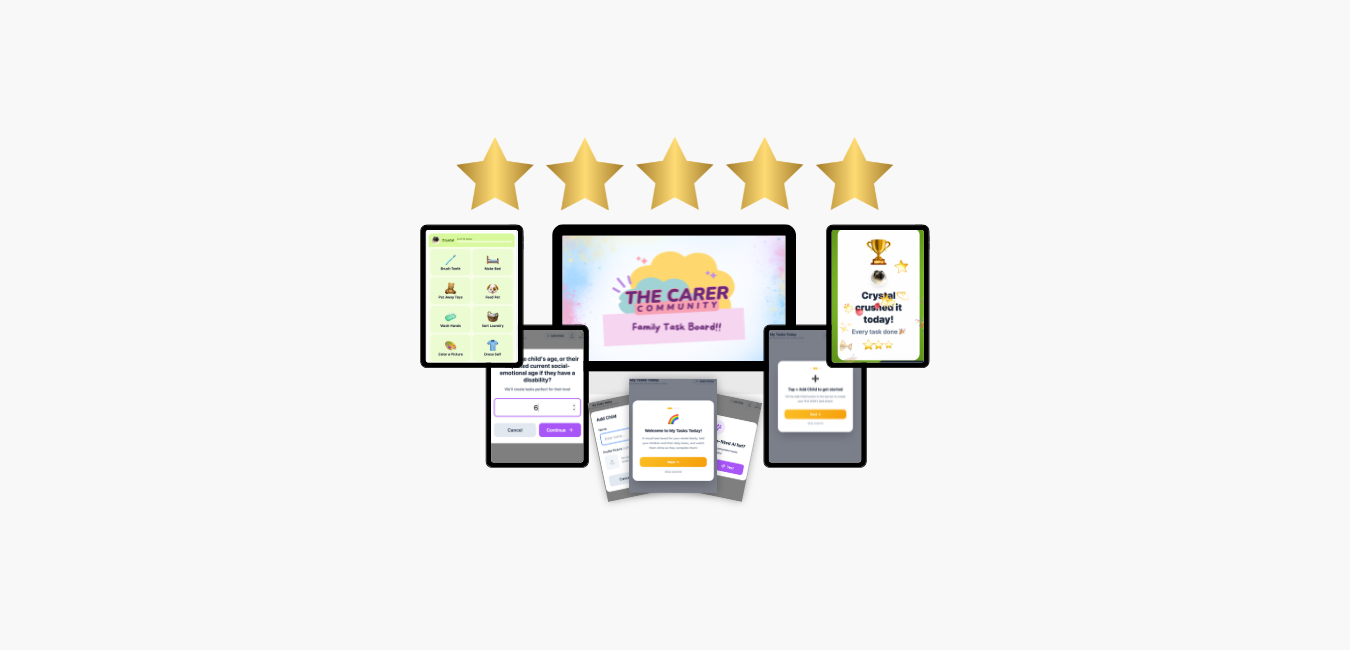
In this brand-new Family Task Board app designed for use on an iPad or tablet, I share a full year of access to everything that your child and their support worker needs to make ticking off their personal care tasks and routine activities easy, effortless, and enjoyable!!
What's Included:
✅ A beautiful, wall-mounted task board built for use on ANY iPad, smart phone or tablet.
✅ Emoji-powered task cards that make chores feel like a game.
✅ A Task Rainbow Celebration: when your child finishes all their tasks, a full-screen rainbow animation lights up with confetti and music!
✅ Individual columns for every child with their own photo, name, progress bar, and personalised task list.
✅ Time-of-day grouping — tasks are organised into Morning, Afternoon, Evening, and Bedtime sections.
✅ Recurring daily tasks that automatically come back every morning.
✅ Drag-and-drop reordering so you can arrange tasks in the exact order your family's routine flows.
✅ One progress bar per child plus a gold star when they hit 100%.
✅ Undo protection: A 5-second undo feature lets your child reverse a tapped task instantly.
✅ Parent dashboard with 7-day history: see how each child performed over the past week with simple bar charts.
✅ Multi-language support: switch between English, Spanish, and French with one tap.
✅ Built-in accessibility: high contrast mode, screen reader support, and colour-blind-safe indicators.
✅ Per-child sound controls: turn celebration sounds on or off for each child individually.
✅ First-time onboarding tutorial that walks new users through everything in under 60 seconds.
✅ Works offline, no internet needed!
Kat’s Final Quick Picks
✅ Cozi App – Best free shared family calendar software
✅ FamCal – Best app with a lifetime payment option
✅ Dockem Koala Mount – Best budget wall mount for an existing tablet
✅ Otto Family Planner Whiteboard – Best low-tech option
✅ Skylight Smart Family Calendar – Features jammed in to justify the hoiked up price
✅ Jam – Best for school email chaos
✅ Dragon Touch – Best subscription-free dedicated screen.